
Last updated on
Nov 6, 2026
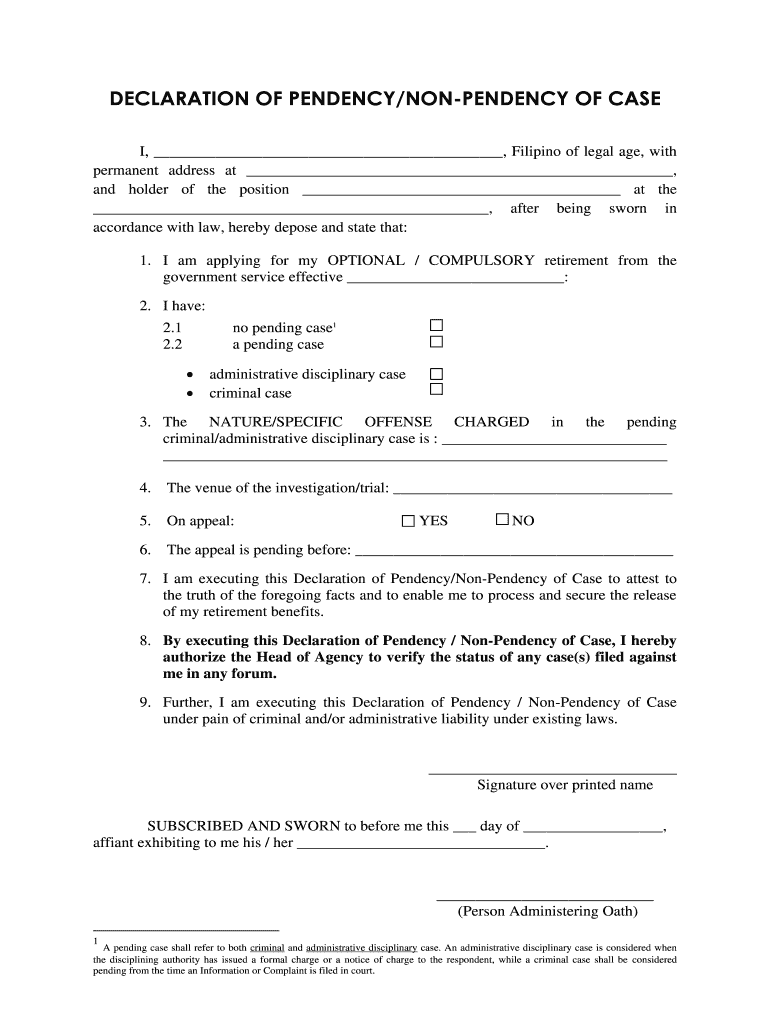
PH GSIS Declaration of PendencyNon-Pendency of Case free printable template
pdfFiller is not affiliated with any government organization

Fill out
Complete the form online in a simple drag-and-drop editor.

eSign
Add your legally binding signature or send the form for signing.

Share
Share the form via a link, letting anyone fill it out from any device.

Export
Download, print, email, or move the form to your cloud storage.
Why pdfFiller is the best tool for your documents and forms


End-to-end document management
From editing and signing to collaboration and tracking, pdfFiller has everything you need to get your documents done quickly and efficiently.
Accessible from anywhere
pdfFiller is fully cloud-based. This means you can edit, sign, and share documents from anywhere using your computer, smartphone, or tablet.
Secure and compliant
pdfFiller lets you securely manage documents following global laws like ESIGN, CCPA, and GDPR. It's also HIPAA and SOC 2 compliant.
What is PH GSIS Declaration of PendencyNon-Pendency of Case
The Declaration of Pendency/Non-Pendency of Case is a government form used by individuals in the Philippines to declare any pending administrative or criminal cases while applying for retirement from government service.
pdfFiller scores top ratings on review platforms




Excellent experience
Excellent experience! All was great and very simple! DWL.
I moved across the country since I had my brochure designed and printed. Meanwhile Covid-19 restrictions gave me the extra push to go 100% virtual with my business. Thus the online marketing material had to be accurate and up to-date. [pdfFiller made it easy for me to easy to update/edit my existing marketing materials.
Who needs PH GSIS Declaration of PendencyNon-Pendency of Case?
Explore how professionals across industries use pdfFiller.

PH GSIS Declaration of PendencyNon-Pendency of Case is needed by:
-
Government employees applying for retirement benefits
-
Individuals seeking to verify their case status
-
Bureaucratic personnel administering retirement applications
-
Legal representatives of the applicants
-
Human Resource departments in government agencies
Comprehensive Guide to PH GSIS Declaration of PendencyNon-Pendency of Case
What is the Declaration of Pendency/Non-Pendency of Case?
The Declaration of Pendency/Non-Pendency of Case is a government form used in the Philippines, specifically for individuals applying for retirement from government service. This document serves to declare whether the applicant has any pending administrative or criminal cases, which is crucial for evaluating eligibility for retirement benefits. Declaring pending cases holds significant legal implications, as it could affect the fulfillment of retirement requirements.
Purpose and Benefits of the Declaration of Pendency/Non-Pendency of Case
This form plays a vital role for government employees seeking retirement. By accurately filling out and submitting the form, applicants can secure their retirement benefits and ensure that their applications undergo smooth verification by their respective agencies. Timely submission of this declaration aids in establishing an applicant's standing and minimizes complications that may arise from unreported cases.
Who Needs the Declaration of Pendency/Non-Pendency of Case?
The Declaration of Pendency/Non-Pendency of Case must be completed by various individuals in specific government positions. Eligible applicants typically include those in permanent roles within government service. Those who have faced previous legal issues, such as administrative liability or criminal cases, may need to disclose this information, as it can directly impact their eligibility for retirement benefits.
How to Fill Out the Declaration of Pendency/Non-Pendency of Case Online (Step-by-Step)
-
Access the form using pdfFiller to begin the completion process.
-
Fill in your personal details, including name and position.
-
Select the nature of any pending cases from the options provided.
-
Specify the venue where cases are filed and their appeal status.
-
Review all entries for accuracy before proceeding to sign.
Field-by-Field Instructions for the Declaration of Pendency/Non-Pendency of Case
To ensure proper completion of the form, each field requires specific information. For instance, the introductory line often states, “I, _____________________________________________, Filipino of legal age…” and requires the applicant’s printed name and signature over that name. Additional common fields might include checkboxes for confirming case details. It is crucial to pay particular attention to fields that frequently lead to errors, as inaccuracies can jeopardize the entire application.
How to Sign or Notarize the Declaration of Pendency/Non-Pendency of Case
Signing the Declaration of Pendency involves both the applicant and the person administering the oath. It is essential to understand the different signing requirements between digital signatures and traditional wet signatures, as both have forms of validity. Notarization procedures should be followed closely to maintain compliance with legal standards, ensuring the document's authenticity.
Submission Methods and Delivery of the Declaration of Pendency/Non-Pendency of Case
Applicants can submit the completed Declaration of Pendency through various methods. These may include electronic submissions via online portals or physical delivery to agency addresses. It’s important to consider potential fees that may be associated with submissions as well as any relevant deadlines and processing times that could impact the retirement process.
What Happens After You Submit the Declaration of Pendency/Non-Pendency of Case?
After submission, applicants can expect to receive confirmation of their application. The review process will typically involve tracking the application status to ensure compliance. Should there be issues during the review, it is vital to be aware of common rejection reasons and how they can be addressed to achieve a successful outcome.
Security and Compliance when Handling the Declaration of Pendency/Non-Pendency of Case
Data security is paramount when filling out the Declaration of Pendency online. pdfFiller employs strong security measures, including encryption, to safeguard sensitive information and ensure compliance with privacy laws. Users can be reassured of the handling and protection of their data throughout the process.
Utilizing pdfFiller to Simplify the Form Completion Process
Users are encouraged to make full use of pdfFiller's features to enhance the form-filling experience. The platform allows for easy editing, eSigning, and management of documents. Ensuring that the final Declaration of Pendency/Non-Pendency meets all requirements before submission is essential for a smooth application process.
How to fill out the PH GSIS Declaration of PendencyNon-Pendency of Case
-
1.To access the Declaration of Pendency/Non-Pendency of Case form on pdfFiller, go to the pdfFiller homepage and enter the form name in the search bar to locate the document.
-
2.Once you open the form, navigate through the sections based on the fields that need to be filled out, such as the applicant's personal information, case details, and administrative declarations.
-
3.Gather all necessary documents and details before starting the form, including any information related to pending cases, case nature, venue, and appeal status to ensure accuracy.
-
4.Take your time to complete each field carefully and check the instructions provided, such as signing over your printed name in specified areas and making selections for checkboxes where applicable.
-
5.Review the entire form for any inconsistencies, missing information, or signs that require signatures from both the applicant and the person administering the oath.
-
6.Once you are confident that all information is accurate and complete, use pdfFiller's features to save your work or make necessary edits.
-
7.Finally, when satisfied with the document, download it in your preferred format, save it to your device, or submit it directly through pdfFiller if submission options are available.

Who is eligible to submit the Declaration of Pendency/Non-Pendency of Case?
Eligibility for this form typically includes government employees applying for optional or compulsory retirement. Individuals must ensure they have no pending administrative or criminal cases that need declaration.
What supporting documents are required with this form?
Support documents often include identification, any legal case documentation if applicable, and evidence of your employment history. Be sure to gather these before starting the form.
How can I submit the Declaration of Pendency/Non-Pendency of Case?
Submission methods may vary, but typically this form should be submitted to your respective agency office, either in person or through the official channels as defined by the agency's regulations.
Are there any common mistakes to avoid when filling this form?
Common mistakes include leaving fields blank, incorrect signatures, or misinterpreting instructions. It's essential to read all sections carefully and review your entries before submission.
What is the processing time for this form?
Processing times can differ by agency and workload. It is advisable to submit the form well in advance of your retirement date to allow ample time for processing.
Is notarization required for the Declaration of Pendency/Non-Pendency of Case?
Yes, this form requires notarization. You must sign the document in the presence of a notary public to authenticate your declarations.
Can I amend my submission if I realize there were mistakes after submission?
If you discover mistakes after submission, contact your agency immediately to inquire about the amendment process. Some forms may allow corrections through formal requests.
Related Content
Related Forms



Related Catalogs
Get the latest insights from our blog



If you believe that this page should be taken down, please follow our DMCA take down process
here
.
This form may include fields for payment information. Data entered in these fields is not covered by PCI DSS compliance.